5. The live draft
Draft night is where OutScore shines. Captains pick from their phones, the room watches the picks land on a big-screen board with confetti, and rosters are built automatically as you go.
Before draft night
Make sure that:
- Draft manager is switched on (Setup wizard or Tournament Settings → Features). Also turn on Show live draft so fans get a Live Draft card on the home page, and Show draft results so the pick order is published afterwards. (Chapter 2)
- Every team exists and has a captain (Chapter 3).
- Every other player is added with no team. Skill ratings and positions help captains a lot.
Then open Draft Manager from the ScoreKeeper hub. It has three tabs: Setup, Live and Order.
Draft Manager: Setup

1. How picks work
- Use a pick order (recommended) — only the team on the clock can pick. Turn it off for a free-for-all where any captain can pick at any time.
- Snake draft — reverses the order every round (1-2-3-4, then 4-3-2-1). Available when a pick order is used.
2. Set the order — shows how many teams are in the order and opens the Order tab.
3. Send captain links — Copy captain link beside each team; paste it to the captain. Links work for 14 days, no account required (Chapter 4).
4. Start the draft — the big button. It's disabled until you have a pick order (when one is in use).
Pick order
On the Order tab press Default (alphabetical by team) or Randomize for a draw, then fine-tune with the arrows. The order is saved as you change it.

Tip
Do the Randomize live in the room — it's a nice moment, and captains see the result instantly on their phones.
Start the draft
Back on Setup, press Start draft. The Draft Manager switches to the Live tab, captains' pick boards unlock, and the public board changes from Waiting to start to On the clock.
How captains pick
From their Team Captain page (captain link or account) captains press Go to draft to open the pick board.
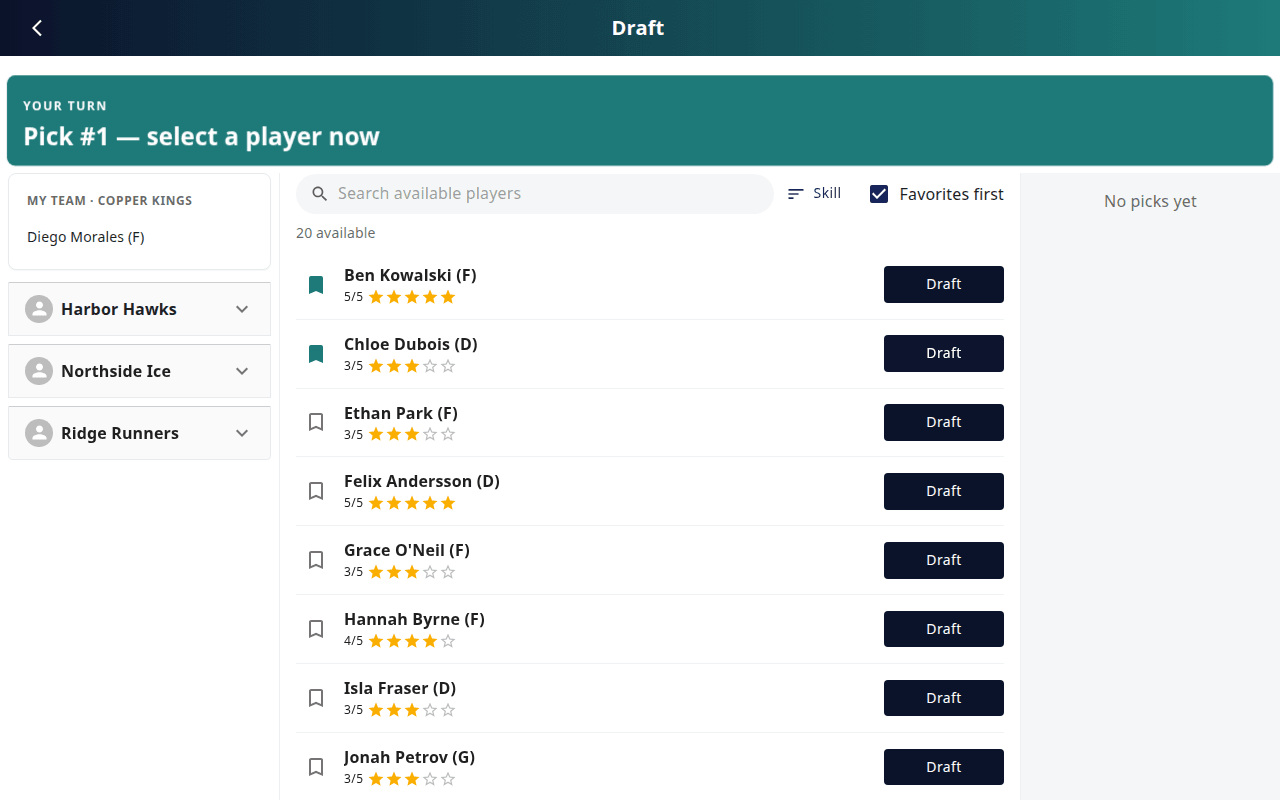
- The banner shows the state: Draft not started, Your turn – Pick #n — select a player now, Waiting – Pick #n · Team is on the clock, or Open draft (no pick order).
- Players — the available pool. Search, sort by Skill or Name, bookmark favourites and tick Favorites first to float them to the top. Tap a name for the player's card.
- Teams — My team plus every other roster as it fills, with an On the clock chip.
- Picks — the running list of picks.
When it's their turn the Draft buttons light up. Pressing one asks Draft <Name>? — This assigns the player to your team and advances the draft.
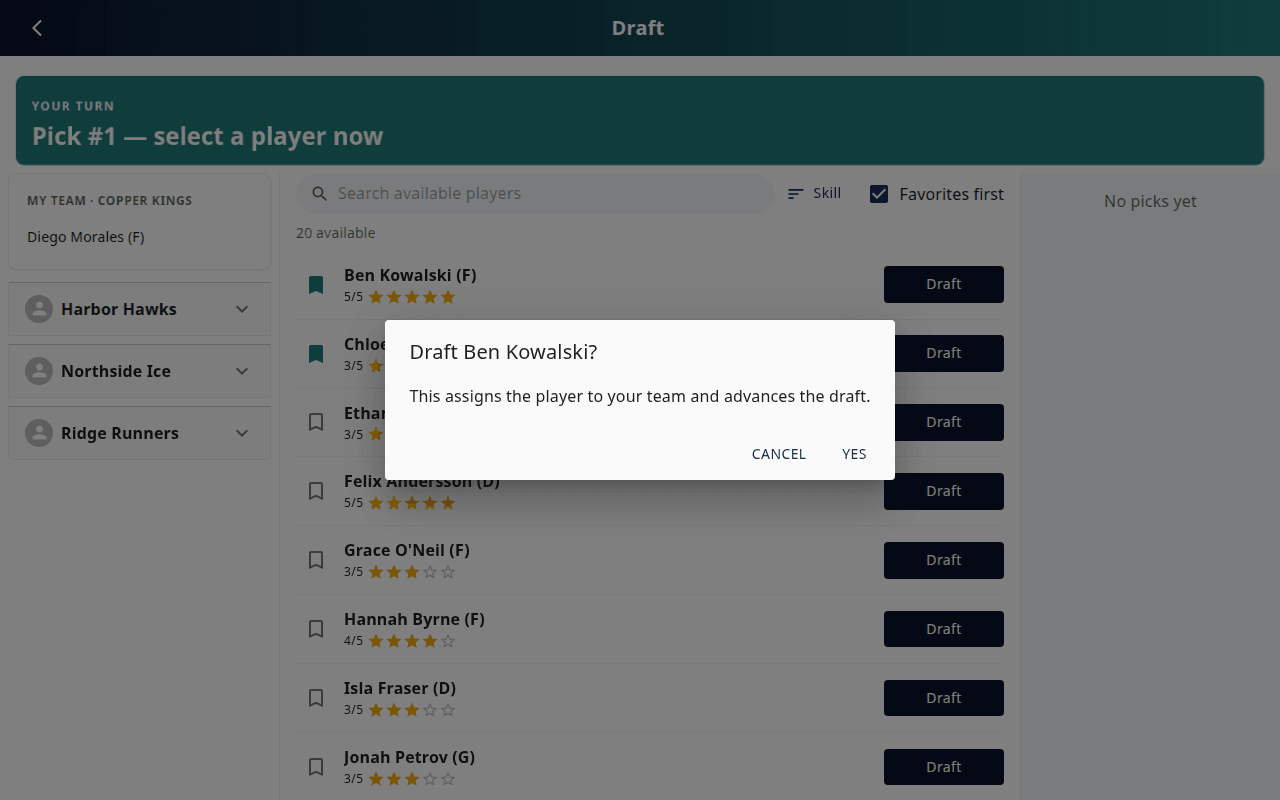
After confirming, the player moves to their team, the pick is recorded, and the clock moves to the next team. The board goes back to Waiting until it's their turn again.

The public draft board
Put /YourID/DraftViewer on the big screen (fans reach it from the home page Live Draft → Go To Draft, or from Public viewer in the Draft Manager). It updates in real time and celebrates each pick with a card and confetti (toggle Confetti on/off in the corner).

It shows who is On the clock, the Recent picks (tap one for details), how many players are still available, and each team's growing roster.
Running the room: Live tab
The Live tab is the organizer's control panel during the draft.

- On the clock — who's up, and which pick number.
- Skip this turn — the captain isn't ready or is away from their phone; the clock moves on and their turn is gone (they'll pick next round).
- Open pick board — the admin's own pick board (useful if you need to pick on behalf of a captain, or you're also a captain).
- Public viewer — jump to the big-screen board.
- Coming up — the next several picks in order.
- Re-order remaining teams — change the order mid-draft if you need to.
- End draft — closes picking. You can do this at any point; players left without a team can be assigned manually.
After the draft
- Press End draft (Live or Setup tab). Captain pick boards lock; captain links keep working for roster viewing.
- Rosters are already built — check All Teams or the public Team Rosters page.
- If Show draft results is on, the public rosters page gets a View Draft Pick Order button listing every pick.

Note
Trades after the draft are done by editing a player's Team on the Players page. A public Trade Announcement module exists and can be enabled by OutScore support.